Workout set types: not all sets are created equal
On paper (or in a notes app), every line looks the same: a weight, some reps. On the gym floor, workout set types tell very different stories. Your 2 × 10 at 40 kg before bench press lives in a different world than your 100 kg × 6, and the strip-the-bar finisher right after your last set is not just "set 5".
A tracker that dumps everything in one bucket produces numbers that lie. Your volume balloons on days you warm up thoroughly. Your "progress" craters when a ramp-up set gets compared against a working set. Your drop sets either vanish or get counted as the full sets they aren't.
That's why Gymmy supports workout set types natively: warm-up, working set, drop set. Not as decorative labels, but as different calculation rules, applied consistently across the whole app.
Mark a warm-up in two taps
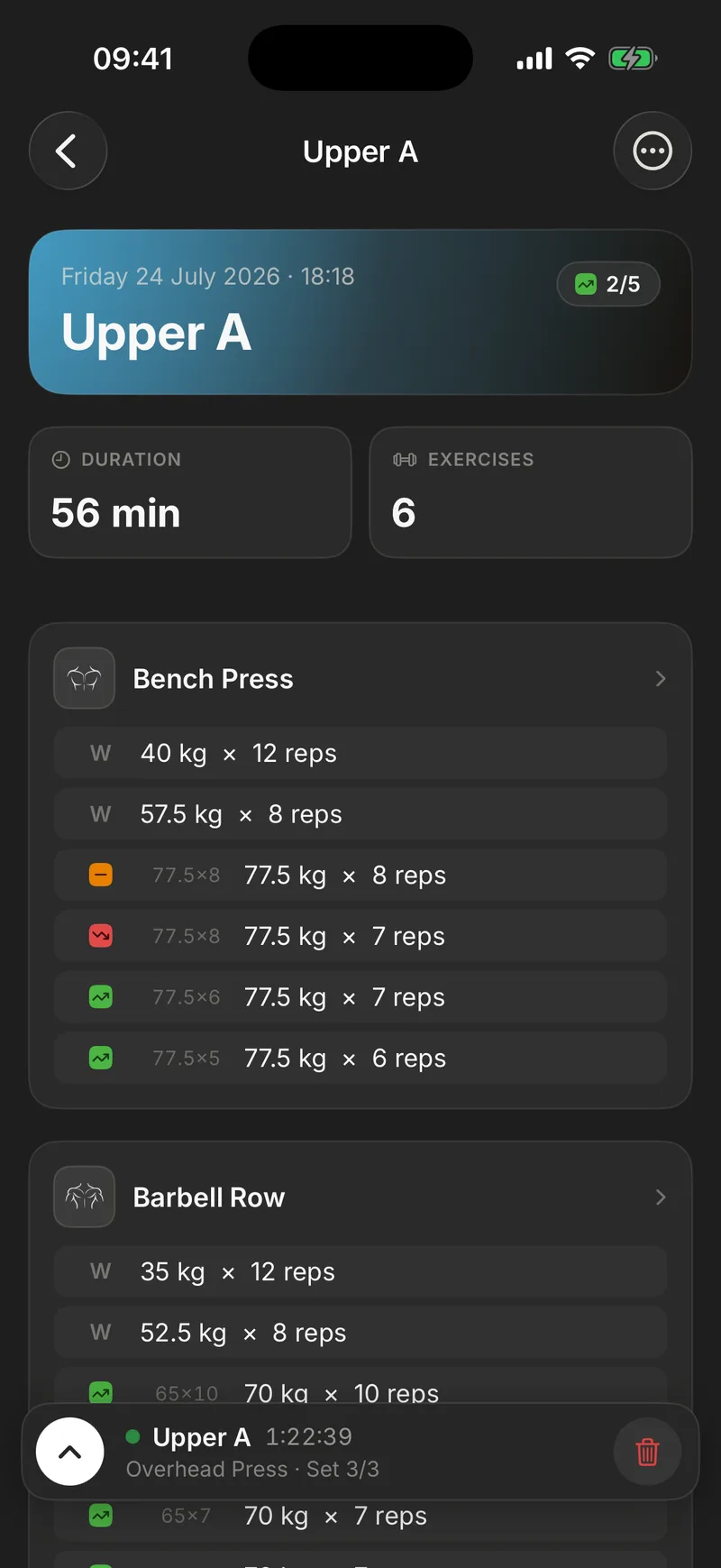
Everything goes through a context menu on the set number. One press and you can mark the set as a warm-up, add a drop set after it, or delete it. No settings screen, no type picker before you start. You log first and qualify when you need to.
A warm-up gets its own marker in the number column, instantly distinguishable from working sets. It even gets its own increment when you log it, ±1 kg instead of ±2.5, because working up to your top weight doesn't have to happen in full-plate jumps.
Like the rest of your workout, warm-ups come back pre-filled next time. Your usual ramp-up is waiting for you, ready to validate. Mark a set once and every workout after that inherits it.
Above all, the rule is clean. A warm-up set is excluded from volume, records and stats. Warming up exists to prepare the joint, not to pad your totals. In practice that means no inflated volume on careful ramp-up days, and never a phantom "record" because a light bar got counted as work.
Drop sets finally get a real home
The drop set is the great orphan of training logs. You finish your set, pull a plate off, and go again immediately at a lighter weight, no rest in between. It's one continuous effort in two stages. Where does that go in a normal log? An extra row that breaks the numbering? A comment field you'll never read again?
In Gymmy, a drop set slots in directly under its parent set, marked "↓" with a colored vertical bar that makes the link visible. One glance tells you these reps belong to the same continuous effort. The drop sits outside the numbering, so it never becomes a fake "set 5".
Two details that match what actually happens on the floor:
- The rest timer doesn't fire on a drop set. You go straight from parent set to drop with no pause, and the app knows it. The rest timer only starts when you validate a genuine end of set.
- Deleting a set deletes its drop sets. A drop means nothing without its parent, and your history never keeps orphan rows.
Numbering that stays readable
The trap with special rows is turning your workout into a puzzle. Gymmy settles it simply: only working sets get numbers. The "W"s and "↓"s live outside the count.
So your set 3 is still your 3rd working set, whether you did two warm-ups first or squeezed a drop between sets 2 and 3. When the plan says "4 sets of bench", you see 1, 2, 3, 4. Not 1 through 7 with a decoder ring to figure out which ones count.
It sounds cosmetic. It isn't. Between sets you have seconds, one free hand, and a heart rate that isn't helping your reading comprehension. Clean numbering is what lets you answer, at a glance, the only question that matters right then: "how many left?"
The same clarity carries into your history. Reopen a workout from months ago and the warm-up markers, the "↓"s and the working-set numbers are exactly as you logged them. You can still tell how that day was actually structured, instead of reading a flat pile of weights and reps.
Stats that don't lie
Where set types really pay off is in the math. Each type follows its own rule, everywhere:
- Warm-up: excluded from volume, records and stats. Zero pollution.
- Working set: counted in full, 1.0 set for the primary muscle and 0.5 for a secondary one.
- Drop set: weighted at 0.5 of a set in muscle volume.
- Unvalidated set: excluded as well. A row you planned but didn't do isn't work. Only validated sets count.
That drop weighting is a deliberate call. A drop set adds real work, and ignoring it would undercount your high-intensity weeks. But it's not a full set started from zero fatigue, and counting it whole would inflate them. At 0.5, your sets-per-muscle totals stay comparable week over week, whether you use drops or not. If you're wondering what to compare those totals against, we've broken down how many sets per muscle per week the literature suggests. Gymmy itself will never prescribe anything.
Comparisons that actually make sense
Set types serve one last purpose, maybe the most important one: keeping your comparisons trustworthy. Gymmy uses smart pairing. Warm-ups are compared with warm-ups, drop sets with drop sets, working sets with working sets.
Your first heavy set today is always matched against your first heavy set from last time. Never against a warm-up that would fake a 40 kg leap, never against a drop that would fake a regression. The ↑ ↓ = arrows shown on every set, and the whole machinery behind progress tracking, are built on that pairing.
Without it, per-set comparison is noise. Picture a naive tracker matching rows by position. Add one extra warm-up today and every comparison shifts by one, so your whole workout reads as a collapse. Type-aware pairing is the unglamorous plumbing that makes the arrows worth trusting.
It's the through-line of the entire app: a number is only worth something when it's compared against its own kind.
Log your sets as what they are
Warm-ups clearly marked, drops attached to their parent set, clean numbering, weighted math. Nothing flashy on screen, but numbers you can finally trust, mid-workout and in Sunday's recap alike. It's the kind of correctness you stop thinking about after two workouts, precisely because it never surprises you.
The best way to feel the difference is one real workout with a proper ramp-up and a drop on the last exercise. Your first 10 workouts are free, no credit card required.
Frequently asked questions
How do you log a drop set in a workout app?
In Gymmy, you open the menu on the number of the set you just finished and pick "Add a drop set". A row slides in right below it, marked "↓" with a colored vertical bar, outside the set numbering. Strip the weight, keep repping, validate, and the drop stays visually attached to the set it came from.
Do warm-up sets count toward my stats?
No, by design. In Gymmy, a set marked as a warm-up is excluded from volume, records and stats. Your 2 × 10 at 40 kg before bench press won't dilute your averages or ever create a fake record. Your numbers only reflect actual working sets, which is what makes them comparable from week to week.
How are drop sets counted in training volume?
Each drop set counts as 0.5 of a set in your per-muscle volume. It's an honest compromise: a drop adds real work, but not as much as a full set started fresh. Ignoring drops would undercount your high-intensity weeks; counting them as full sets would inflate them. The 0.5 weighting keeps your weekly totals comparable.
Are my sets compared against the right kind of set?
Yes. Gymmy pairs sets by type: warm-ups are compared with warm-ups, drop sets with drop sets, and working sets with working sets. Your first heavy set today is always matched against your first heavy set from last time, never against a warm-up. That's what keeps the ↑ ↓ = progression arrows trustworthy.