What a workout logging app is really up against
Search for a workout logging app and you'll get dozens of results. Yet on the gym floor, the number one competitor is still Apple Notes. Not because it's good at this. Because it's fast. Nobody wants to tap through three screens between two sets of squats.
Call it the ten-second test. Between sets, your hands are sweaty, only one of them is free, and there's exactly one thing to remember: 80 kg, 8 reps. If your tracker needs more than ten seconds to capture that, you'll end up rounding from memory, batch-logging at the end, or quitting altogether. A log filled in from memory an hour later isn't a training history, it's a reconstruction.
Gymmy was built around that exact moment. Fast logging isn't one feature among many. It's the foundation everything else stands on, from stats to records to week-on-week comparisons. Honest numbers start with numbers written down as they happen.
A number pad made for iron, not for texting
In Gymmy, you never see the iPhone keyboard. Everything goes through a dedicated decimal number pad with big keys, digits and a decimal separator, nothing else. No autocorrect, no suggestions, no text keyboard popping up because a field was wired wrong.
A stack of small details around that pad adds up fast:
- Auto-select on tap. Touch the weight field and the existing value is already selected, so your next keystroke replaces it outright. No cursor to position, no deleting digit by digit.
- − / + buttons. 2.5 kg per tap on the weight (the smallest plate in most gyms) and 1 rep on the reps. Going from 80 to 82.5 kg is literally one tap.
- A finer step on warm-ups. ±1 kg, because working up to your top weight doesn't always happen in 2.5 kg jumps. Each of Gymmy's set types follows its own logic.
- Comma or period, your call. "82.5" and "82,5" are the same weight, and your thumb shouldn't have to think about which one.
It all comes back to one constraint. Logging has to work one-handed, phone resting on your thigh or held over the bench, without eating into your rest.
Your workout arrives already filled in
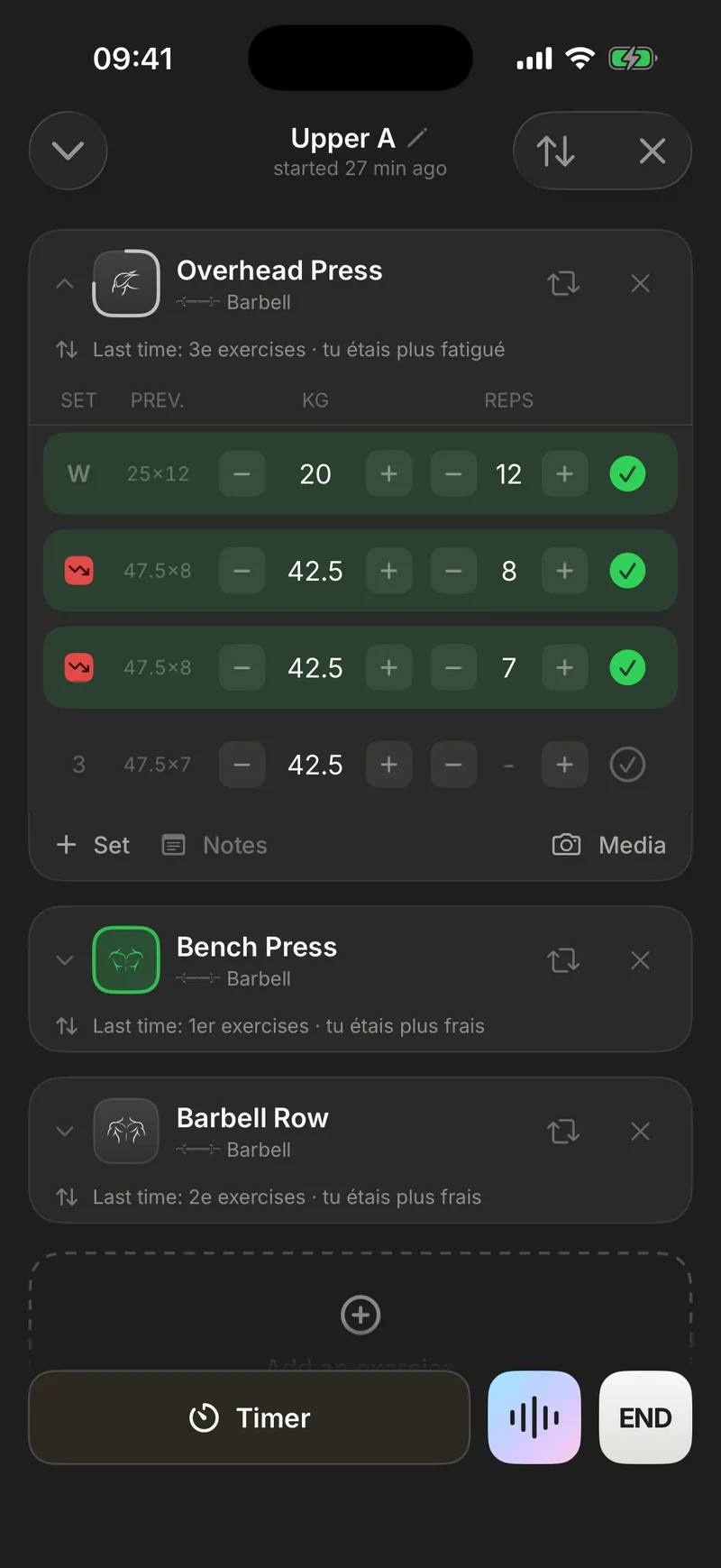
The fastest thing to type is the thing you don't type. Start a workout and every exercise loads pre-filled with the sets from your last one: same weights, same reps, already in place, just not validated yet. Repeat last time's work and logging a set means validating it. One tap. Adding a little weight is one tap on "+2.5".
Everything you need to know where you stand sits on the line itself:
- The "PREV" column shows, in grey, the weight × reps you hit on that same set last time. No digging through your history mid-workout. The reference is right next to the set you're about to do.
- An arrow (↑, ↓ or =) replaces the set number whenever a comparison makes sense. Set by set, in real time, you see whether you're moving forward. No mental math.
The comparison is honest about what it compares. Warm-ups are matched against warm-ups, working sets against working sets. Your first heavy set never gets flattered by being lined up against last week's empty-bar ramp-up.
That's the difference between a training log and a notepad. Gymmy knows what you did last time and puts it in front of you exactly when it matters. The full charts, history and trends live in progress tracking.
Validating a set triggers everything else
In Gymmy, validating a set isn't a checkbox. It's the one action the whole workout hangs off, and everything else chains from it.
The row turns green, with a light haptic tap so you get confirmation without looking at the screen. If the set beats your all-time best, the haptic changes to a success pattern and a trophy appears on the row, live. You know you hit a PR while you're still standing there, because your personal records are detected during the workout, not three days later in some menu.
The rest timer starts automatically at the same instant. No second app, no timer to remember. Validating the set is starting the rest.
Once every set of an exercise is validated, Gymmy advances to the next exercise on its own. No card to collapse, no scrolling to find your place. By the time you walk over to the next machine, the app is already there.
"+ Set" and swipe: managing rows in one tap
On the days everything moves well, you add an extra set. The "+ Set" button duplicates the previous one, weight and reps carried over as-is, ready to validate or tweak. Never an empty row to fill from scratch.
Going the other way, a left swipe deletes a set. Validated too fast? Un-validate it. The row goes back to neutral, the arrows and any trophy disappear. Your stats only keep what you actually did.
The same thinking runs through the whole workout. Squat rack taken, so you're starting on leg press instead? Reorder exercises with a long press and a drag, haptics included. Want the workout named after what it actually turned into? Tap the title and rename it. Need your phone for something else? Minimize the workout. It keeps running, nothing is lost.
None of this is spectacular, and that's the point. Managing the workout should stay below the threshold where you notice it. One tap, one result, back to the bar.
Nothing gets lost, ever
A training log is only worth anything if you can trust it blindly. Gymmy saves your workout on every single change. If the system kills the app, your iPhone dies, or you swipe everything away out of habit, the workout in progress resumes exactly where it stopped, validated sets included.
Same stance on connectivity. Logging works fully offline. Basement gym, airplane, dead zone. Everything is written locally the instant you tap, then syncs in the background once you're back online. You never watch a spinner between sets.
For the days you trained without your phone, scribbling on paper or not writing anything down at all, past workout entry lets you catch up. Pick the date, enter your sets as usual, and the workout joins your history with a "Manually entered" badge, duration hidden so it doesn't pollute your averages.
A log that disappears behind your workout
Fast logging isn't a stopwatch race for its own sake. Every second saved between sets is attention handed back to what actually matters: the bar, your technique, your rest. The best workout tracker is the one you forget about mid-workout and find complete and trustworthy afterwards.
That's the part you can test for yourself. Your first 10 workouts are free, no credit card required. Time your first logged set. That's usually where the decision makes itself.
Frequently asked questions
What's the fastest way to log sets during a workout?
Use a tracker that pre-fills your sets. In Gymmy, every exercise loads with the weights and reps from your last workout. Repeat them and logging a set is just validating it, one tap. Otherwise you adjust on a dedicated number pad or with ±2.5 kg buttons, one-handed, without the iPhone keyboard ever appearing.
Do I have to re-type everything every workout?
No. Gymmy carries over the sets from the last time you did that exercise: same weights, same reps, in place but not yet validated. A grey "PREV" column reminds you what you did, set by set. You only touch what changes, usually a single +2.5 kg tap or one extra rep.
What happens if the app closes mid-workout?
Nothing is lost. Gymmy saves your workout on every change. If the system kills the app, your iPhone restarts, or you swipe everything closed by accident, the workout in progress resumes exactly where it was, validated sets included. You never have to log anything twice.
Can I log a workout I did without my phone?
Yes. Gymmy lets you enter a past workout. Pick the date, add your exercises and sets as usual, and it joins your history with a "Manually entered" badge. Its duration is hidden so it doesn't skew your stats. Handy when you scribbled on paper or trained phone-free.