The two-app problem
Ask anyone who logs their training in a notes app how they handle their rest timer, and you'll get the same answer: the Clock app. Set done, switch app, start a timer, switch back, find your line again. Repeat twenty times a workout. Half the time you forget the timer entirely and scroll your feed until "that felt like two minutes".
Rest times matter. Consistent rest is what makes two workouts comparable. Five minutes between sets and ninety seconds between sets are two different workouts, even with the same numbers on the page. If you want your progress tracking to mean anything, your rest has to stay roughly constant, and that only happens when measuring it costs you nothing.
Started by your own logging
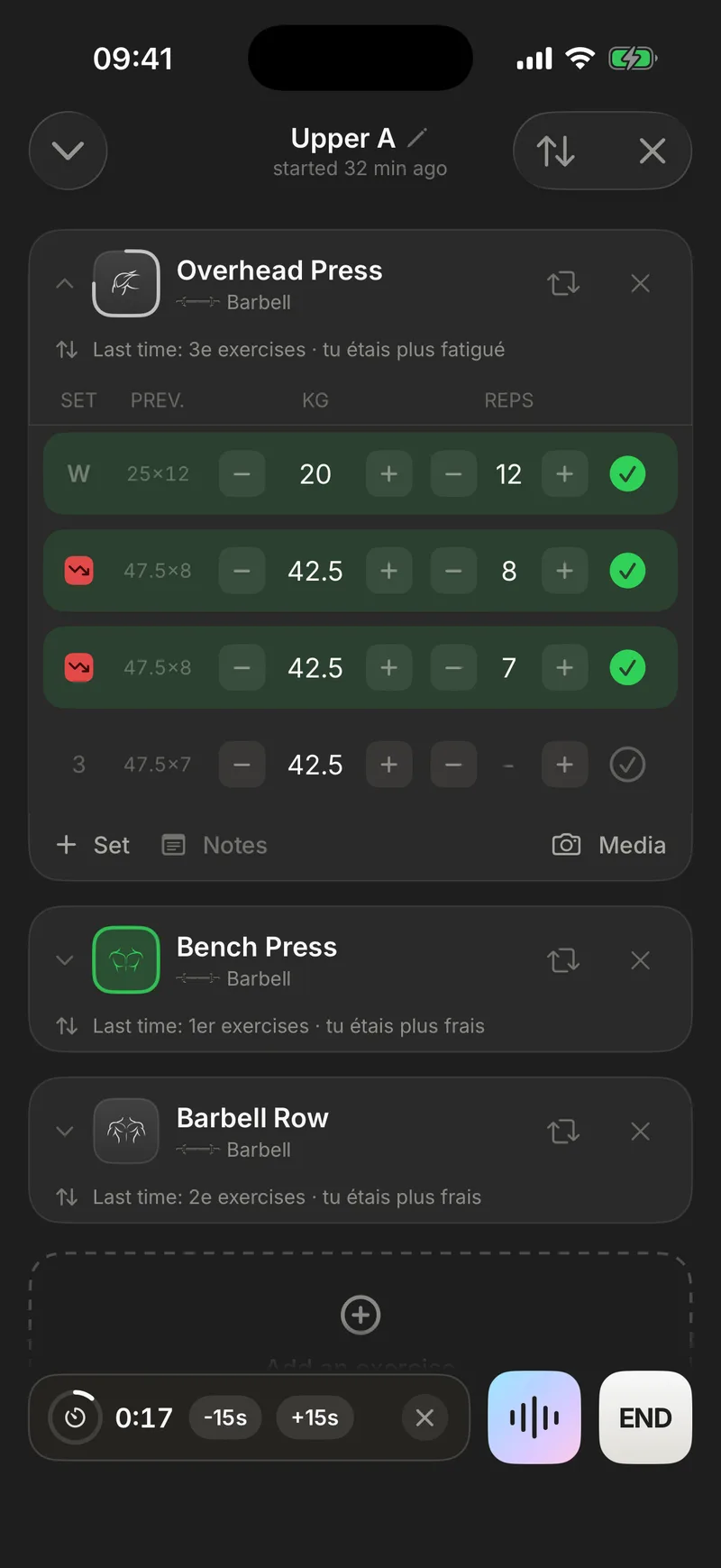
In Gymmy, the timer is wired to the thing you already do. The moment you validate a set, the rest timer starts. No extra tap, no separate app, no discipline required. You log 80 kg for 8, rack the bar, and the countdown is already running: progress ring filling, remaining time in minutes and seconds.
While the timer runs, the logging screen doesn't move. Your next set is already pre-filled with last time's numbers, the "PREV" column right there in front of you. Rest is for recovering, not for getting the app ready.
Two exceptions, both intentional:
- Drop sets don't start a timer. A drop set follows the working set immediately, with no rest. A countdown firing at that moment would just be noise. Gymmy knows the difference between your set types and acts on it.
- There's also a manual Timer button, for starting a rest on your own when you want one without validating a set. Automatic is the rule, manual is always there.
A rest timer set once, precise per exercise
Most timers force one choice on you. 90 seconds for everything, deadlifts and curls alike. Gymmy is more granular than that.
- A default duration, with presets at 30 / 60 / 90 / 120 / 180 seconds for the common cases, plus a slider from 15 seconds to 5 minutes, in 15-second steps, for everything else.
- A duration per exercise. This is the real unlock: your squat can keep its 3 minutes while your lateral raises run at 60 seconds, without you touching anything mid-workout. Any exercise without its own setting simply uses the global value.
The default duration and the end-of-rest alert live in the app's settings, and each exercise can then be given its own time. In practice you spend thirty seconds setting up your five or six main lifts, then never come back to it.
Set it up once and the timer always has the right duration from then on, set after set, week after week. That's the difference between a stopwatch and a log that knows your training.
Back on the bench at the right moment
A timer that rings at zero is already too late. You're still sitting down, phone in hand. Gymmy warns you ahead of time.
- The "almost ready" alert is adjustable. 10, 15, 20 or 30 seconds before the end, depending on how long it takes you to put the phone down and get back under the bar.
- Two distinct notifications: "Almost ready", then "Rest time is over, back to it!", with a success haptic at the end. Even with your phone face-down on the bench, you know.
- −15 s / +15 s buttons, with haptic feedback. Someone asks you for a spot, the machine frees up early, and the timer adjusts in one tap instead of getting abandoned.
That early warning changes more than it seems. The gap between restarting at zero and restarting forty seconds late, multiplied by twenty sets, costs you a quarter of an hour and leaves you with rest periods you can't compare week to week. The alert gives that quarter hour back without rushing you. You just know, a little ahead, that it's about to be go time.
The point isn't to drill you with a whistle. It's to make "I'm going again in 90 seconds" actually true, without you watching anything.
On your lock screen, not buried in an app
The timer lives as a Live Activity, on your lock screen and in the Dynamic Island, remaining time visible at a glance, ring counting down. Your phone sits on the bench, screen locked, and you still know exactly where you are.
Better still, the −15 s / +15 s buttons are interactive right from the lock screen, without unlocking, without reopening the app. It isn't just the timer, either. Your whole workout runs its own Live Activity, showing the current exercise and set count. We wrote a full page about the Live Activity, because it deserves one.
A timer that survives everything
The Achilles' heel of in-app timers is the system itself. iOS kills a backgrounded app and the counter dies with it. Gymmy sidesteps that at the root: the timer is not a counter ticking inside the app, it's a persisted end date. The app can go to the background, get killed, your iPhone can restart. When Gymmy comes back, the timer shows exactly the right remaining time, because the end of your rest never stopped existing.
The workout itself gets the same treatment. Phone dies mid-workout, app killed by the system, and you reopen Gymmy to find everything there, validated sets included, timer included. Nothing you do between sets depends on iOS being in a good mood.
It also means everything works with no network. The timer, its notifications and its Live Activity are entirely local, like the rest of Gymmy. In a basement gym, nothing changes.
And when a rest period stops being useful (last set done, change of plan), you dismiss the timer manually in one tap. Automatic doesn't mean pushy.
One piece of a log that keeps up with you
The auto timer comes from one simple idea. Between sets you have seconds and one free hand, so logging has to be instant. Weight, reps, validate, rest. The timer starts, last week's numbers stay in front of you, and when the machine you need is taken, the flip card handles that too.
If your current system is a notes app plus the Clock app, you already know what's broken. Your first 10 workouts on Gymmy are free, no credit card. That's about how long it takes for validating a set and watching the timer start itself to become a reflex, and for the Clock app to go back to timing pasta.
Frequently asked questions
Does the rest timer really start on its own?
Yes. The timer starts automatically the moment you validate a set, with no extra tap. There are two deliberate exceptions: drop sets don't trigger a timer, since they follow the previous set with no rest, and a manual Timer button is always available if you want to start a rest period on your own, outside of validating a set.
Can I set a different rest time for each exercise?
Yes, and that's where the timer earns its keep. You set a default duration using presets from 30 to 180 seconds or a slider from 15 seconds to 5 minutes, in 15-second steps. Then any exercise can carry its own time: longer on squats, shorter on isolation work. Exercises without a specific setting simply fall back to the global value.
What happens if I lock my iPhone or the app gets closed?
Nothing bad: the timer keeps going. Gymmy persists the end date of your rest rather than running a simple counter, so the remaining time stays accurate even if the app goes to the background or gets killed by the system. The timer shows as a Live Activity on your lock screen, and notifications tell you when rest is over.
Does the rest timer work without a connection?
Yes, completely. The timer is local to your iPhone: it needs no network to start, run, display its Live Activity or fire its notifications. Like everything in Gymmy, it behaves exactly the same in a basement gym, in airplane mode, or on gym wifi that never works. Your whole workout, logging included, runs offline and syncs later.