Your program, not a program
Most workout routine apps ship with a catalog of programs and quietly assume you'll pick one. If you've been lifting for a few years, you probably won't. You already run a split that works for you, PPL, Upper/Lower or your own hybrid, adjusted over time, built from exercises you chose.
Gymmy starts from that reality. There is no catalog and no recommendation engine. A routine in Gymmy is simply your workout, saved: your exercises, in your order, ready to launch. The app's opinion about your programming is that it has none. Its job is to make your routines fast to create, pleasant to launch, and honest about what they record. Whether you rotate three fixed workouts or improvise half the time, the log follows how you train, not the other way around. You know why the incline press comes before the flyes. The app doesn't need to.
A bento grid you read at a glance
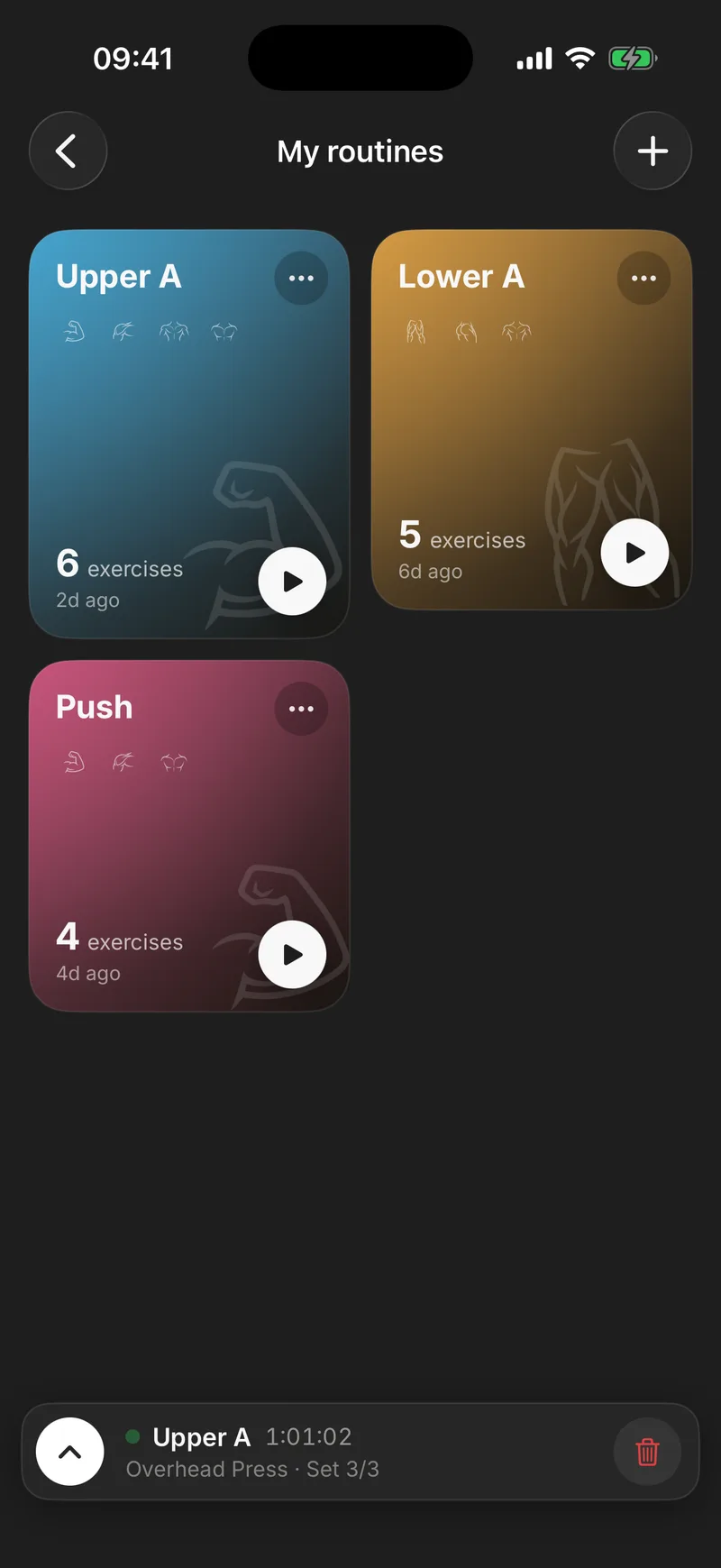
Your routines don't pile up in a grey list. They live on a two-column bento grid, masonry style, where the height of each tile reflects its number of exercises. Your big leg day takes up more space than your Saturday shoulder top-up. Before you read a single name, you can see the shape of your training.
Each tile carries the essentials:
- One of 8 routine colors, picked by you. Push in one color, Pull in another, legs in whatever color legs deserve.
- The dominant muscle's icon as a watermark, derived from the exercises the routine contains. A leg tile looks like a leg tile.
- Last used: "3d ago", "yesterday" or "today", right on the tile. The routine you've been dodging for two weeks tells on itself.
- A play button. Training starts straight from the tile, no detail screen in between.
When the order stops making sense, you rearrange the grid with drag and drop, like the icons on your home screen. Three routines or ten, the grid stays a dashboard. You open the app, see where your split stands, and hit play.
Build a workout routine in a minute
There are two ways to build a routine, and the second one is often better:
- From scratch: a free-form name, exercises added with multi-select, numbered, reorderable. One minute, stopwatch in hand.
- From a past workout. The one you just nailed can become next Monday's template in two taps. You don't have to remember what you did, it's already written down.
After that, the routine keeps living. Rename it freely, duplicate it when the mesocycle changes so version 2 starts where version 1 left off. Its detail screen also keeps the history of every workout done with it, in one place. Handy for checking, before you load the bar, how the last three Push days actually went.
Most importantly, launching a routine never opens a blank form. Every exercise arrives with last time's sets already in place, weight and reps pre-filled, your previous numbers in grey right where you type. Progressive overload starts with knowing the number to beat, and fast logging takes care of the rest.
"Plan my next workout"
The moment you know what you're doing tomorrow is rarely when you walk into the gym. It's the night before, on the couch. Gymmy has a button for that: "Plan my next workout". Pick the routine and it parks itself as a banner on your home screen. Tomorrow, one tap and you're training, no navigating anywhere. It's a small thing, but it's exactly the kind of friction that kills a workout. The fewer decisions to make when you walk into the gym, the faster the bar gets loaded.
Don't feel like formalizing? The home screen also lets you repeat one of your 5 recent workouts in one tap, or start an empty one and improvise. Routines are a tool, not a toll booth. Gymmy keeps comparing your workouts with each other even when you rename them, so the lineage survives.
Made to be broken mid-workout
A routine is a plan, and plans meet crowded gyms. In Gymmy, deviating is cheap. Add an exercise on the fly, remove one, reorder with drag and drop, or flip the card when the machine is taken. The original exercise stays intact in your template.
One detail changes everything over time: the routine and the workout stay in sync. Exercises you add mid-workout are fed back into the routine when you finish. That hammer curl you've been sneaking into the end of Pull day for three weeks? It ends up in the template, without you editing anything by hand. Your routine doesn't go stale in a drawer while your actual training moves on. It follows.
Exercise swaps, on the other hand, never touch the template. A machine taken on one crowded Tuesday shouldn't redesign your program.
Eight colors that tell your training story
A routine's color isn't tile decoration. It shows up everywhere in the app, on the home screen's week strip, on the month calendar, on the year's mini-calendars, in your history, and on the header and summary of every workout.
Your training calendar then becomes readable without opening a single workout. Three orange dots this week and nothing green in ten days? You already know Push is running fine and legs are waiting. That's the kind of thing a spreadsheet will never tell you at a glance.
The same logic runs through your history. Every workout card carries its color, and so does the detail header. After a few weeks, you navigate your training months by color, like a subway map.
Share it with a link
Built a workout a friend keeps asking about? Share the routine as a simple web link. They open it in their browser, see the exercises, and save it into their own Gymmy in one tap. Any exercises they don't have yet are recreated automatically on import. No screenshots of a notes app, no dictating sets in the locker room. The routine arrives clean, ready to launch, and their numbers stay theirs. If you train in the same gym, training together picks up from there.
Everything your routines produce, validated sets, records, volume per muscle, lands in the same log, automatically. If you want to see what that looks like with your real split, your first 10 workouts are free, no credit card. Enough time to build your routines and wear them in.
Frequently asked questions
Can I create a routine from a workout I already did?
Yes, and it's often the best way to do it. Any past workout can become a routine in two taps, with the exercises and their order carried over as they were. You can also just repeat one of your 5 recent workouts in one tap from the home screen, without creating a routine at all. Improvise first, formalize later.
Does Gymmy come with ready-made training programs?
No, on purpose. Gymmy is built for self-coached lifters who already run their own split. There is no program catalog, no recommendations, no plan to follow. A routine is your workout saved, with your exercises in your order. The app records and compares. It never prescribes.
How do I share a routine with a friend?
Every routine can be shared as a simple web link. Your friend opens it, sees the exercise list, and saves it into their own Gymmy in one tap. Any exercises missing from their library are recreated automatically on import. No screenshots of a notes app, no dictating sets in the locker room.
What happens to my routine if I change things mid-workout?
Exercises you add mid-workout are fed back into the routine when you finish, so your template follows what you actually do instead of going stale. Swapping an exercise because the machine is taken is different. That never touches the routine, and the original stays in place for next time.